
⚠️ Important: This Article Applies to Community-Created Groups Only Groups that are synced from GrowthZone AMS behave differently. Synced groups default to Private, and while the privacy level can be changed within Community, the Allow Request to Join/Leave Group toggles are set to off and deactivated — they cannot be enabled on synced groups. The settings described in this article apply only to groups created directly within the Community platform.
The Goal: Understand the available group types and privacy settings for community-created groups so you can structure your Community platform to best support member engagement, collaboration, and security.
Before You Begin:
- You have admin access to your Community platform.
- You have a clear understanding of your organization's member structure and engagement goals.
Microlearning Overview
[INSERT VIDEO: 1 to 2-minute screencast covering group types and privacy settings in Community]
Sample Types of Community Groups
To maximize engagement and create a welcoming environment, setting up community groups that reflect the interests, needs, and goals of your members is crucial. These groups can be structured in various ways to encourage collaboration, knowledge sharing, and networking. Below are common group types along with recommended privacy settings for each.
Board of Directors
A dedicated space for your organization's leadership to collaborate, strategize, and share insights in a secure and confidential environment. This group fosters open dialogue among board members, allowing for the exchange of ideas, best practices, and key decision-making processes.
Recommended Privacy: Secret
A dedicated space for your organization's leadership to collaborate, strategize, and share insights in a secure and confidential environment. This group fosters open dialogue among board members, allowing for the exchange of ideas, best practices, and key decision-making processes.
Recommended Privacy: Secret
Special Interest Groups
A supportive space filled with like-minded individuals who share a passion for a specific hobby or interest area.
Recommended Privacy: Public
A supportive space filled with like-minded individuals who share a passion for a specific hobby or interest area.
Recommended Privacy: Public
Membership Group
A dedicated space for members to collaborate, update their profile, and add details to your membership directory.
Recommended Privacy: Private — Allow Request to Join/Leave toggled off
A dedicated space for members to collaborate, update their profile, and add details to your membership directory.
Recommended Privacy: Private — Allow Request to Join/Leave toggled off
Networking / Chapter Groups
A dedicated space for members to network, share ideas, and discuss upcoming local events.
Recommended Privacy: Public or Private
A dedicated space for members to network, share ideas, and discuss upcoming local events.
Recommended Privacy: Public or Private
Resource Groups
A place to house exclusive resources offered to your members.
Recommended Privacy: Private — Allow Request to Join/Leave toggled off
A place to house exclusive resources offered to your members.
Recommended Privacy: Private — Allow Request to Join/Leave toggled off
Privacy Settings Explained
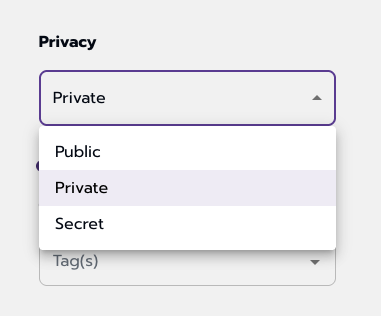
- Public — Anyone can join or leave the group, and the group is visible to all end users.
- Private — Anyone can see the group exists; however, members must be added by an admin on the backend or be an existing member of a list within GrowthZone AMS.
- Secret — The group is only visible to existing members. Anyone not already in the group must be added on the backend by an admin.
- Allow Request to Join/Leave Group — Typically toggled on only for Public groups that are not managed within GrowthZone AMS. Private groups managed through GrowthZone should have this toggled off, as group membership is dependent on list or committee membership. This toggle is grayed out and unavailable when a group is designated as Secret, since users can only be added on the backend.
Common Pitfalls
- Enabling Join/Leave on AMS-Managed Groups: If your group is tied to a list or committee in GrowthZone AMS, leave the Allow Request to Join/Leave toggle off. Turning it on can allow members to self-remove from groups that should be controlled by AMS membership rules.
- Applying These Settings to Synced Groups: The privacy toggles covered in this article are only configurable for community-created groups. Synced groups have the Join/Leave toggles deactivated by default and cannot be changed.
Comments
0 comments
Article is closed for comments.